Does ChatGPT recommend you?
Make it easy to contact and book you, for people and AI agents
When someone asks an AI assistant how to reach or book a business, it can only answer with what it can read on your website. Some tools, like booking in Google's AI Mode, go further and take the user to your booking page. In one hour, write your contact details as text, turn every way to reach you into a real link, and keep your forms simple.
· By the Letzscale team · 9 min read
On this page
- Time
- 1 hour
- Difficulty
- Easy to medium
- Who
- You, with whoever edits your website
- You need
- Your fact sheet from Guide 04 and access to your website editor
- Checked
- 24 October 2026
Part of the Letzscale guides: free, step-by-step fixes that help ChatGPT and other AI assistants find, understand and recommend your business. New here? Start with Guide 01: Check what ChatGPT says about your business.
Why it matters
People now ask AI assistants practical questions: "How do I book an appointment with a fiduciary in Strassen?", "What is Café Ribeiro's phone number?", "Does Kastell Conseil work in German?". The assistant can only answer with what it can read. If your phone number is in an image, your opening hours sit inside a widget, and the only way to reach you is a form, there is little for it to pass on.
Some assistants also go one step further and act for the user. Google documents that AI Mode in Search can look for restaurant reservations, event tickets and beauty and wellness appointments across booking platforms and websites, then link the user to the booking page to finish. For these tools, a clear booking link and a simple form are what a visitor uses, whether that visitor is a person or software working for one.
Before · contact form only
Their website has a contact form. I could not find a phone number, opening hours or a way to book online.
After · contact facts as text
You can book a free 30-minute call online, call +352 12 34 56 (Monday to Friday, 8:30 to 17:30) or email hello@fiduciaire-veldrin.example. They work in French, German and English. Correct
Illustration with a fictional business.
Reference
What providers document about AI agents today
"AI agent" is used loosely. Here is only what the providers themselves have published, as of 24 October 2026.
| Feature | What the provider says | Where |
|---|---|---|
| Agentic booking in Google AI Mode | You describe what you want. AI Mode searches several reservation platforms and websites for real-time availability, shows a list, and links to the booking page so you finish the booking yourself, with partners such as OpenTable, Resy or Ticketmaster. | Restaurants: United States (November 2025) and United Kingdom (April 2026). Event tickets and beauty and wellness appointments: United States, for Labs users. Google has not announced it for Luxembourg. |
| Google-Agent | A Google visitor "used by agents hosted on Google infrastructure to navigate the web and perform actions upon user request". Because a user asked for the visit, Google says such visitors "generally ignore robots.txt rules". | Listed in Google's crawler documentation. Google names no product and no country for it. |
| AI Mode in Luxembourg | Google's Help Center lists Luxembourg among the countries where AI Mode is available, and French and German among the supported languages. | Luxembourg. The help page does not mention bookings. |
| Restaurant bookings in ChatGPT search | ChatGPT can find restaurants and available times, with availability from OpenTable, Resy or Yelp. You confirm the details and complete the booking yourself. ChatGPT may ask your permission to fill in your name and email. | OpenTable: available globally. Resy: United States. Yelp: United States and Canada. Eligible consumer plans only, not ChatGPT Work, Business, Enterprise or Edu. |
| Cloud browser in ChatGPT Work | OpenAI says "ChatGPT agent is no longer available" and points to the cloud browser for browser tasks. It gives ChatGPT Work its own browser on a separate computer in the cloud that "can read web pages, click buttons, enter information into forms". OpenAI's examples include "Check restaurant availability or request quotes from businesses". It is designed to ask for confirmation before steps such as "confirming a booking or making a payment". | ChatGPT Work on paid plans in supported regions, not Free or Go. OpenAI gives no country list and says availability can vary during rollout. |
Developer note. OpenAI says some websites use security measures that block automated browsers, so a site may block ChatGPT's cloud browser. If you want to allow it: the cloud browser signs its requests (Web Bot Auth, HTTP Message Signatures). On Cloudflare it is recognised as a signed agent with detection ID 129220581, which you can allow with a WAF custom rule. On Vercel, OpenAI says no setup is needed. Guide 11: Check if Cloudflare or your firewall blocks AI bots shows how to see what your firewall blocks.
What this means for you
None of this needs special code. The same things that help a customer on a phone help an agent: contact facts written as text, links that go somewhere real, a booking page that opens without a login, and forms with clear labels. Do them once and every visitor benefits.
If you take bookings, a real, public booking link (for a restaurant, for example your OpenTable page) and simple forms help both people and these tools. That makes booking you possible. It does not guarantee that ChatGPT or any other assistant will suggest you.
Before you start
Have these ready
- Your fact sheet from Guide 04: Correct the wrong facts ChatGPT tells about you. Copy your phone number, email, opening hours and languages from there, so they match everywhere.
- The public link to your booking page, if you use a booking tool. Open it in a private browser window: it must work without logging in.
- A login to your website editor (WordPress, Webflow, Wix) or, for a custom-built site, your developer's contact.
Steps
Five changes to your contact page
Write your contact facts as plain text
On your contact page, and in short in the footer of every page, write out what someone needs to reach you. As text, not inside an image, a map or a chat widget:
Contact block · fictional fiduciaryFiduciaire Veldrin Book a free 30-minute call: fiduciaire-veldrin.example/book Phone: +352 12 34 56 Email: hello@fiduciaire-veldrin.example Ask for a quote: fiduciaire-veldrin.example/quote Opening hours: Monday to Friday, 8:30 to 17:30 Languages: French, German, English We reply to emails within one business day.
- Write the phone number with
+352, so it works from abroad and matches your other listings. - Say which languages you work in. In Luxembourg this is often the first thing a customer wants to know.
- Only promise a reply time you keep.
Then check the text is really in the page your server sends, not added later by a script: open the page source and search for your phone number. Guide 12 shows how, and why it matters: Google itself notes that "not all bots can run JavaScript".
- Write the phone number with
Turn each way to reach you into a real link
Give each action its own clear button or link, named after what happens: "Book a call", "Ask for a quote", "Call +352 12 34 56", "Email us". Each one should be a normal link that goes somewhere:
- Phone: a
tel:link. On a mobile phone, tapping it starts the call. - Email: a
mailto:link. It opens the visitor's email program. - Booking and quotes: a link to a page with its own address, not a button that only opens a pop-up.
For your developer · real links<a href="https://fiduciaire-veldrin.example/book">Book a call</a> <a href="https://fiduciaire-veldrin.example/quote">Ask for a quote</a> <a href="tel:+352123456">Call +352 12 34 56</a> <a href="mailto:hello@fiduciaire-veldrin.example">hello@fiduciaire-veldrin.example</a>
Google's guidance is plain: it "can only discover your links if they are <a> HTML elements with an href attribute". A clickable box built with a script is not a link a crawler can follow.
- Phone: a
Give your booking tool a public link
Many booking tools (Cal.com, Calendly, a restaurant reservation system, a salon booking app) offer two things: a widget you embed in your page, and a public booking page with its own address. Use the embed if you like it, but also show the public link as a normal text link next to it. A widget that only appears after a script runs can be invisible to software that reads the page.
Use the same booking link on your Google Business Profile, so it is the same everywhere. Google's steps: go to your profile at
business.google.com. On Google Search, select Booking. On Google Maps, select Edit profile, then Booking. Select Add link, paste your booking address and select Save. If you have several, use Set preferred link to choose the main one.Keep forms short, and label every field developer
Ask only for what you need to reply: often name, email and a message. Each field needs a visible label that says what goes in it. The W3C, which writes the web's accessibility standards, asks for labels on "all form controls" and says the label's
formust exactly match the field'sid. A greyed-out example text inside the field is not a label.For your developer · a simple labelled form<form action="/contact" method="post"> <label for="name">Name</label> <input id="name" name="name" type="text" required> <label for="email">Email</label> <input id="email" name="email" type="email" required> <label for="message">What can we help with?</label> <textarea id="message" name="message" required></textarea> <button type="submit">Send message</button> </form>
- Make sure the form itself is in the page source (check 1 in Guide 12), not loaded by a third-party script after the page opens.
- Always show your email and phone number next to the form, so there is another way to reach you.
Add contactPoint to your structured data developer
If you followed Guide 05, your homepage already has a block of structured data describing your business. Google's Organization documentation describes
contactPointas "the best way for a user to contact your business", asks you to include the support methods you offer, and to "include the country code and area code in the phone number".Add inside your Organization or LocalBusiness block"contactPoint": { "@type": "ContactPoint", "contactType": "customer service", "telephone": "+352 12 34 56", "email": "hello@fiduciaire-veldrin.example", "availableLanguage": ["fr", "de", "en"] }Use the same phone number and email as on the page. Structured data must describe what visitors can see: Guide 05 explains the rule and how to test the block.
Example
Our own contact page
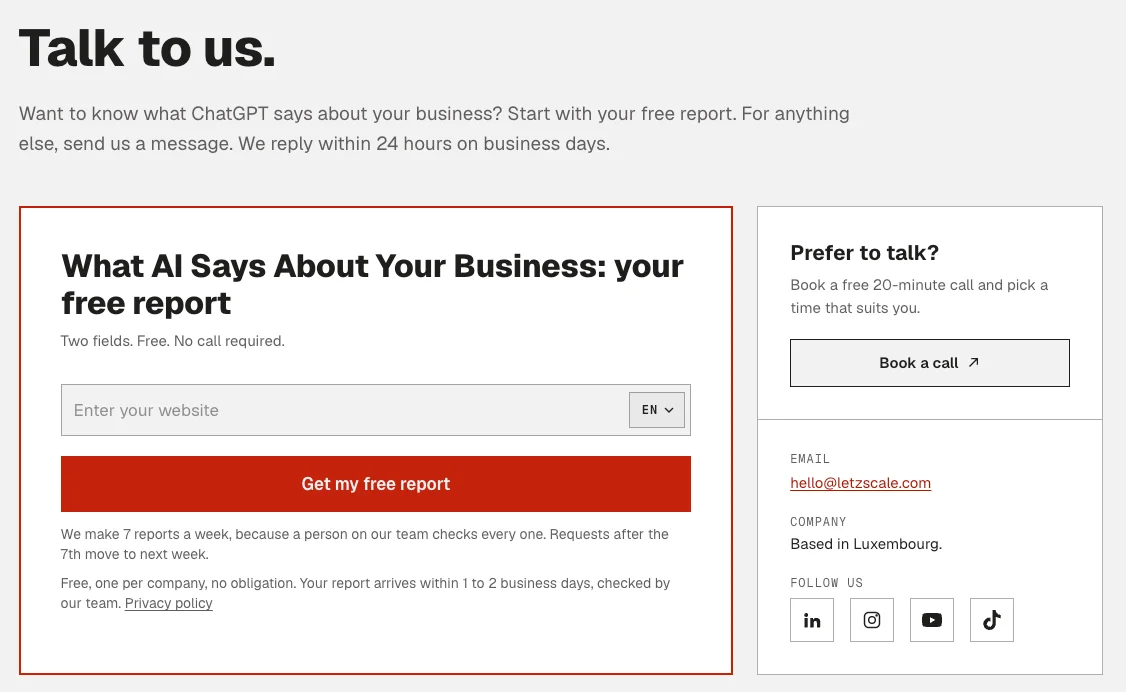
On letzscale.com/contact we give three ways to reach us, all in the page source:
- Book a call: a normal link to our public Cal.com booking page, where you pick a time for a free 20-minute call.
- Email:
hello@letzscale.com, written out as text and as amailto:link. - A message form with three labelled fields: Name, Email and Message.
The page also says when to expect a reply: within 24 hours on business days. Write down only the channels you actually answer.
Check it worked
Test it like a customer, then like a machine
- On your phone: open the contact page, tap the phone number, the email address and the booking button. Each should do what it says.
- In a private browser window: open your booking link. It should show free times without asking you to log in.
- In the page source: search for your phone number, your email and the word "Book" (Guide 12, check 1).
- Structured data: run your homepage through Google's Rich Results Test and check the phone number and email match the page (Guide 05).
Done when
- Your contact page shows phone, email, booking link, opening hours and languages as text.
- Each action is a real link:
tel:,mailto:or a page address. - Your booking page opens from a public link without a login, and the same link is on your Google Business Profile.
- Every form field has a visible label, and the form is in the page source.
- Your structured data has a
contactPointwith the same phone and email as the page.
Common mistakes
What usually goes wrong
- A form as the only way in. Some people, and some tools, will not use it. Always show an email address and, if you have one, a phone number.
- Contact details in an image or a map only. A picture of your phone number cannot be copied, tapped or quoted.
- A booking widget with no link. The calendar appears only after a script loads. Add the tool's public booking link as plain text.
- Different numbers in different places. The website, Google Business Profile and directories show different phone numbers or hours. Copy everything from one fact sheet.
- Buttons that are not links. "Contact us" opens a pop-up but has no address of its own, so nothing outside your page can point to it.
- Placeholder text instead of labels. The hint disappears as soon as someone types, and the field has no name.
Sources, checked 24 October 2026
- Google: agentic booking in AI Mode, 17 November 2025
- Google: Booking restaurants in the UK just got easier with AI in Search, 10 April 2026
- Google: agentic capabilities in AI Mode, 21 August 2025
- Google: User-triggered fetchers (Google-Agent)
- Google Search Help: AI Mode in Google Search (countries and languages)
- OpenAI Help Center: Searching the web with ChatGPT
- OpenAI Help Center: Using cloud browser in ChatGPT
- OpenAI Help Center: ChatGPT agent
- OpenAI Help Center: ChatGPT Work's Cloud browser allowlisting
- Google: Organization structured data (contactPoint)
- Google: Understand JavaScript SEO basics
- Google Business Profile Help: Manage your local business links
- W3C WAI: Labeling Controls
- MDN: The anchor element (tel: and mailto: links)