Can ChatGPT read your website?
Get found by Google and Bing
Copilot looks at Bing results before it answers, ChatGPT often searches the web first, and Google's AI answers come from Google's own index. In about 2 hours you connect your website to both, hand them a list of your pages, and check that your key pages are stored, clearly titled and fast.
· By the Letzscale team · 12 min read
On this page
- Time
- 2 hours
- Difficulty
- Easy
- Who
- Whoever manages your website
- You need
- A Google account, a Microsoft account, your domain settings or website editor
- Checked
- 13 October 2026
Part of the Letzscale guides: free, step-by-step fixes that help ChatGPT and other AI assistants find, understand and recommend your business. New here? Start with Guide 01: Check what ChatGPT says about your business.
Why it matters
Google says a page must be indexed, meaning stored in Google's database of web pages, to appear in AI Overviews and AI Mode. Gemini apps also use content from the Google Search index to answer with up-to-date facts.
Microsoft Copilot sends search queries to Bing and writes its answer from what Bing returns. ChatGPT also often looks at search results before it answers. A page that Google or Bing has not stored cannot be found when these assistants look things up.
Google Search Console and Bing Webmaster Tools are the free dashboards where both search engines show you what they have stored. Google itself recommends verifying your website in Search Console.
Before · page not in Bing
Two garages nearby offer quick service: Garage A and Garage B.
Your garage is not named. Absent: 0
After · page in Bing
Garage A, Garage B and Your Garage, which offers same-week servicing. Can be named
Illustration with fictional businesses.
T1 · T5 · T6Got your Starter audit? This guide fixes T1 "Indexed in Google and Bing", T5 "Page titles and descriptions" and T6 "Speed and mobile" on page 07 (Technical and agent readiness). In a free Snapshot, it is linked from your top fixes on page 06.
Reference
Words you will meet
Crawl and index
To crawl is to visit a page and read it; search engines do this with automated programs called crawlers. To index is to store the page so it can be shown in results. A page can be crawled and still not be indexed.
Sitemap
A file on your website that lists the pages you want search engines to know about. Most website builders create it for you, often at yourcompany.lu/sitemap.xml.
DNS and TXT record
DNS is the address book that connects your domain name, such as yourcompany.lu, to your website and email. A TXT record is one line of text in it. Adding one proves to Google that you control the domain.
noindex
A hidden instruction in a page's code that says "do not show this page in search results". Useful for a thank-you page, harmful on your home page.
Before you start
Have these ready
- A Google account you will keep. A shared company account is better than one person's private address.
- A Microsoft account for Bing Webmaster Tools.
- A login to the place where your domain's DNS is managed. For a
.ludomain this is usually the company you registered it with, or your web agency. - If you cannot reach the DNS: a login to your website editor (WordPress, Webflow, Wix) to paste a tag instead.
- A list of your 5 to 10 most important pages: home, each main service or menu, booking, contact.
- Guide 02: Let ChatGPT read your website done, or at least checked. A robots.txt that blocks crawlers undoes everything here.
Steps
Connect your website to Google and Bing
Do a quick check with a site: search
On google.lu, type
site:followed by your domain, with no space and nowww. Google then shows only pages from your website.Type this in Google, with your own domainsite:yourcompany.lu
- No results at all. Google has not indexed your website. Steps 2 to 4 are the fix.
- Some results, but your service pages are missing. Note which ones; you will check them in step 4.
- All your key pages appear. Good. Continue anyway: Search Console shows problems this search cannot.
Treat the number of results as a rough count only. Google says this search does not necessarily return every indexed page. The real figures are in Search Console.
Set up Google Search Console
Go to search.google.com/search-console and sign in. Open the property selector at the top left, choose Add property, and pick one of two types. A property is simply the website you want to follow. Google help
Domain property URL-prefix property You type yourcompany.luhttps://www.yourcompany.lu/Covers Every version: with and without www, http and https, and subdomains such as shop.yourcompany.luOnly addresses that start with exactly what you typed Prove ownership by A DNS record only (usually TXT) Several methods, including an HTML tag on your home page Choose it if You can reach your DNS settings (recommended) You can only edit your website 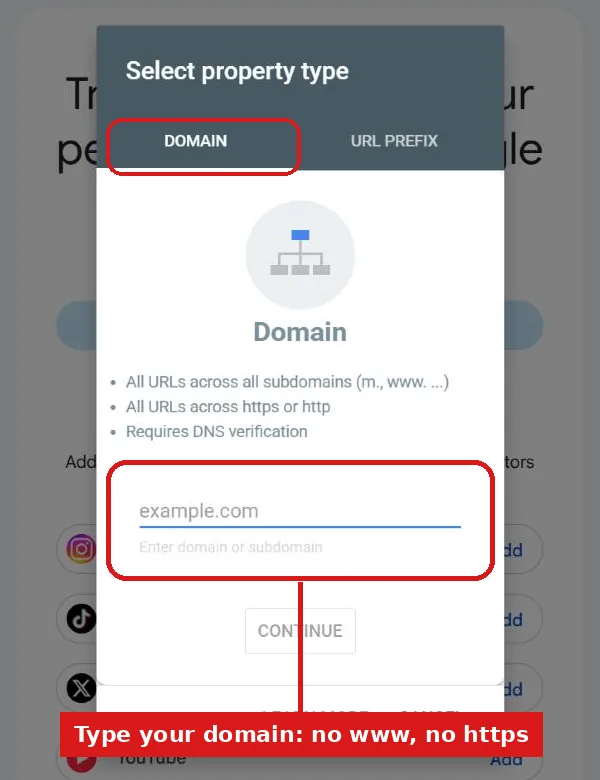
The "Select property type" dialog in Search Console. Choose Domain and type your domain without www or https, for example yourcompany.lu. Screen as of October 2026. To verify a Domain property with DNS:
- Search Console shows a line of text starting with
google-site-verification=. Copy it. - In your DNS settings, add a new record. Type:
TXT. Host or name: leave blank or enter@. Value: paste the line. - Save, return to Search Console and click Verify. If it fails, wait a day and try again: Google says new records can take up to two or three days to work. Google help
If you cannot reach the DNS, choose URL-prefix and the HTML tag method. Paste the tag into the
<head>section of your home page, the hidden part of the page code. Search your website editor's help for "add code to head", or ask your web agency.Leave the TXT record or the tag in place for good. Google checks it again from time to time and removes your access after a grace period if it is gone.
- Search Console shows a line of text starting with
Submit your sitemap
First find your sitemap. Try
yourcompany.lu/sitemap.xmlin a browser. If you see a list of web addresses, that is it. If not, check the last line of your robots.txt (see Guide 02), which often names it.letzscale.com/sitemap.xml · the start of our own sitemap<urlset xmlns="http://www.sitemaps.org/schemas/sitemap/0.9" ...> <url> <loc>https://letzscale.com</loc> <lastmod>2026-10-12T00:00:00.000Z</lastmod> </url> <url> <loc>https://letzscale.com/pricing</loc> <lastmod>2026-10-12T00:00:00.000Z</lastmod> </url> ...Each
<loc>line is the full address of one page we want search engines to find. Ours also lists the French and German version of each page, so search engines connect the languages.In Search Console, open the Sitemaps report from the left-hand menu. Paste the full address of your sitemap in the box Add a new sitemap and click Submit. Google help
- Success means Google read the file without errors.
- Couldn't fetch means Google could not open it. Check the address, and check that robots.txt does not block it.
- Has errors means Google opened it but found problems. Google still uses the addresses it could read.
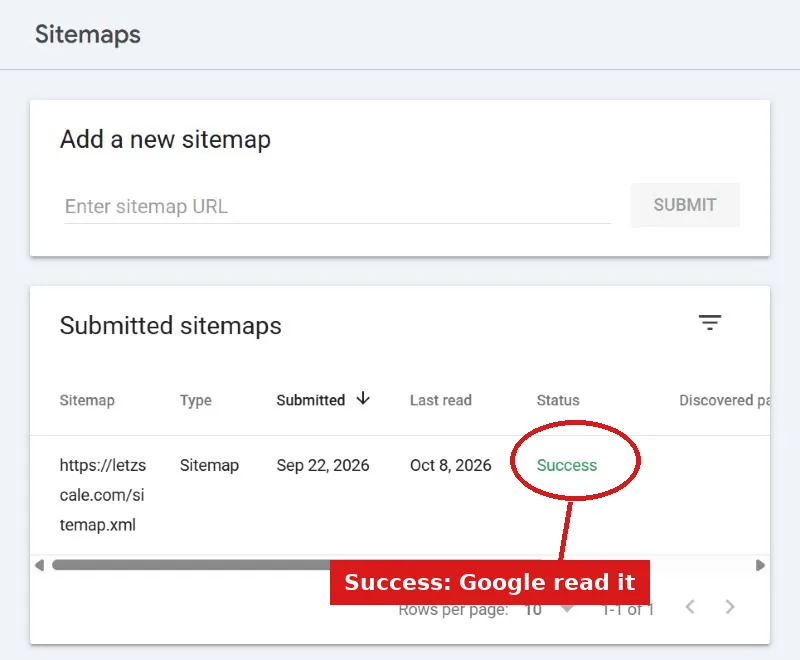
Our own Sitemaps report: submitted 22 September 2026, last read by Google on 8 October, status Success. A sitemap is a hint, not an order. Google says submitting one does not guarantee that every page in it will be crawled or indexed.
Read the Page indexing report and fix your key pages
Open the Page indexing report. It sorts every page Google knows into Indexed and Not indexed, with a reason for each group. Google help
Not every page needs to be indexed, and Google says that is normal. Look only at whether your key pages are in the Not indexed list, and why:
Reason shown What it means What to do URL marked 'noindex' The page tells Google not to show it. If it is a key page, remove the noindex setting in your website editor. URL blocked by robots.txt Your robots.txt keeps Google out. Fix it with Guide 02. Crawled, currently not indexed Google read the page and chose not to store it for now. No need to resubmit. Google says it may or may not be indexed later. A clearer, more useful page helps. Discovered, currently not indexed Google knows the page but has not visited it yet. Wait. Check again in a few weeks. Page with redirect The address sends visitors on to another page. Usually fine. Make sure the page it leads to is indexed. Not found (404) The page does not exist. Fine if you removed it. If not, fix the link or the page. Then check each key page by hand. Paste its full address into the search bar at the top of Search Console. This is the URL Inspection tool. Google help
https://www.yourcompany.lu/menu
URL is on Google
The page can appear in Google results.https://www.yourcompany.lu/booking
URL is not on Google
Excluded by 'noindex' tag. Fix the reason, then click Request indexing once.What the two results look like for a key page. Illustration with a fictional website. - URL is on Google: the page can appear in results. Google adds that this is not guaranteed.
- URL is not on Google: the page will not appear. Fix the reason shown, then click Request indexing once.
There is a daily limit on these requests, so keep them for your key pages. Google says crawling can take from a few days to a few weeks.
Add your website to Bing Webmaster Tools
Go to bing.com/webmasters and sign in. When you add a site, choose the option to import it from Google Search Console. Sign in with the same Google account and click Allow. Bing announcement
- Tick your website in the list and click Import.
- Bing verifies it for you and copies the sitemaps you submitted to Google.
- Bing says traffic data for a newly imported site can take up to 48 hours to appear.
Open Sitemaps in Bing Webmaster Tools and check that your sitemap is listed. If it is not, submit the same address there. Then use Bing's URL Inspection on your home page and your main service pages; it shows whether Bing has indexed each one. Bing blog
Bing matters more than its share of searches suggests: Copilot looks things up through Bing, and many websites never connect to it.
Give each key page a clear title and description
Look at your
site:search from step 1. The headline of each result usually comes from the page's title, and the short text under it often comes from its description. Both are set in your website editor, usually in a field called SEO or Search.- Title: short, different on each page, and saying what the page is. Google advises against vague titles such as "Home". A clear title reads like "Business lunch in Kirchberg | Brasserie Example".
- Description: one or two plain sentences on what the page offers, for whom and where. Google may use it as the text under the headline. "Lunch menu from €19, Monday to Friday, five minutes from the European Court."
Start with the pages from your key list. Rewrite any title that is vague, repeated on several pages, or just your business name.
Check your key pages load fast on a phone
Many people who ask ChatGPT for a recommendation then open the website on their phone. Slow pages lose those visitors, and Google crawls less often when a server responds slowly.
- Open pagespeed.web.dev, paste your home page address and click Analyze. Stay on the Mobile tab.
- At the top, Core Web Vitals Assessment says Passed or Failed, based on real visits. Small websites may see "No data"; then use the score below it.
- If it fails, look at the list of suggestions. The most common fix is images that are too large: ask whoever manages your website to compress them.
Repeat for your two or three most visited pages, such as the menu or booking page. Speed work on custom code is a job for your developer.
Check it worked
Confirm both search engines know your pages
Come back after one or two weeks. Open the Page indexing report in Search Console and URL Inspection in Bing Webmaster Tools, and check your key pages again.
Done when
- Your website is verified in Google Search Console, and the TXT record or tag is still in place.
- The Sitemaps report shows your sitemap with the status Success.
- URL Inspection says "URL is on Google" for your home page and each main service page.
- Your website is in Bing Webmaster Tools with your sitemap listed.
- Each key page has its own clear title and description.
- Your home page passes on mobile in PageSpeed Insights, or you have sent the suggestions to your web person.
Common mistakes
What usually goes wrong
- A leftover noindex. A website built on a test server can have "hide from search engines" switched on, and it stays on after launch. Google says to look for this in your platform's search engine settings.
- Verifying the wrong version. A URL-prefix property for
http://yourcompany.lushows nothing abouthttps://www.yourcompany.lu. A Domain property avoids this. - A sitemap full of the wrong addresses. Google asks for full addresses of the preferred version of each page. Pages that redirect elsewhere or are blocked by robots.txt do not belong in it.
- Expecting results within hours. Google says crawling can take from a few days to a few weeks, and indexing is never guaranteed.
- Pressing "Request indexing" again and again. Google says repeated requests for the same address do not get it crawled faster, and there is a daily limit.
Sources, checked 13 October 2026
- Google: AI features and your website
- Google: Common crawlers (Google-Extended and grounding in Gemini Apps)
- Microsoft: Data, privacy, and security for web search in Microsoft Copilot and Microsoft Copilot Chat
- Google: site: search operator
- Search Console Help: Add a website property · Verify your site ownership
- Search Console Help: Sitemaps report · Build and submit a sitemap
- Search Console Help: Page indexing report · URL Inspection tool
- Google: Ask Google to recrawl your URLs · Block search indexing with noindex
- Google: Influencing your title links · Control your snippets
- Google: Core Web Vitals · PageSpeed Insights
- Bing Webmaster Blog: Import sites from Search Console · URL Inspection tool