Can ChatGPT read your website?
Website basics AI checks first: HTTPS, one domain, fast on mobile
AI assistants often look things up in Google and Bing, which read a website better when it is secure, on one address and fast on a phone. In about an hour you can check HTTPS, 301 redirects, mixed content and Core Web Vitals, and know what to ask your host to fix.
· By the Letzscale team · 9 min read
On this page
- Time
- 1 hour
- Difficulty
- Medium
- Who
- Your developer or your hosting company, with you checking the result
- You need
- A browser, your website address, and the contact of whoever hosts your website
- Checked
- 24 October 2026
Part of the Letzscale guides: free, step-by-step fixes that help ChatGPT and other AI assistants find, understand and recommend your business. New here? Start with Guide 01: Check what ChatGPT says about your business.
Why it matters
AI assistants often look things up in search engines before they answer. Google says a page must be in its index to appear as a link in AI Overviews and AI Mode, and that the usual search best practices, including "a great page experience", still apply. Microsoft Copilot sends search queries to Bing and writes its answer from what Bing returns.
So the basics that help search engines read and trust your website also help the assistants that draw on them. Three of them are quick to check:
- A secure address (HTTPS). Google asks "Are your pages served in a secure fashion?" in its own page experience checklist, and prefers HTTPS pages over HTTP copies.
- One address for the whole website. If
yourcompany.luandwww.yourcompany.luboth show the same pages, search engines see two copies and have to guess which one is yours. - Fast on a phone. Google indexes the mobile version of your pages, and its ranking systems use Core Web Vitals, its three speed and stability measures.
None of this makes an assistant recommend you. No AI provider says it ranks businesses by speed. These checks remove reasons for a search engine to read the wrong copy of your website, or to read it less well.
| Address typed | Before · four copies | After · one address |
|---|---|---|
http://kastell-conseil.example | Opens the site, not encrypted | 301 → https://www.kastell-conseil.example |
http://www.kastell-conseil.example | Opens the site, not encrypted | 301 → https://www.kastell-conseil.example |
https://kastell-conseil.example | Opens the site | 301 → https://www.kastell-conseil.example |
https://www.kastell-conseil.example | Opens the site | Opens the site The one address |
Illustration with a fictional business.
This guide is short on purpose. To check that Google and Bing have stored your pages, and to fix page titles, follow Guide 03: Get found by Google and Bing.
Reference
Words you will meet
HTTPS
The secure version of a web address. The connection between the visitor and your website is encrypted. Addresses that start with http:// are not.
301 redirect
A permanent forward. When someone, or a crawler, asks for an old address, your server answers "moved permanently" and gives the new one. Google treats 301 and 308 as permanent and uses them as a strong sign that the new address is the one to show. A 302 or 307 is temporary: the old address may stay in search results.
Mixed content
A secure HTTPS page that still loads some files, such as images, scripts or fonts, over plain http://. Browsers upgrade some of these files and block others, so parts of the page can break.
Core Web Vitals
Google's three measures of how a page feels to use: how fast the main content appears (LCP), how fast the page reacts when you tap (INP), and how much the layout jumps around while loading (CLS).
Before you start
Have these ready
- Your website address, and a decision: with
www.or without. Either is fine. If you are unsure, keep the one already printed on your business cards and used in your links. - The contact of your hosting company or developer. Redirects are set on the server or in the hosting panel, not in the page text.
- Two pages to test for speed: your home page and your most important service page.
- Optional, for developers: a Terminal window (Mac or Linux) to run
curl.
Steps
Check and fix the three basics
Type the four versions of your address
In a private browser window, type each of these, with your own domain, and look at the address bar once the page has loaded:
http://yourcompany.luhttp://www.yourcompany.luhttps://yourcompany.luhttps://www.yourcompany.lu
Good: all four end on exactly the same address, starting with
https://. Needs fixing: any of them stays onhttp://, shows a security warning, shows an error, or stays on its own version while showing your pages.Then try one inner page the same way, for example
http://yourcompany.lu/contact. It should land on the same inner page in the secure version, not on your home page.Developers: confirm the redirect is a 301, in one step
A browser hides what kind of redirect happened.
curl -sIshows the server's answer: the status line and theLocationit points to. Here is our own website, checked on 24 October 2026:Terminal · letzscale.com, 24 October 2026$ curl -sI http://letzscale.com HTTP/1.1 301 Moved Permanently Location: https://letzscale.com/ $ curl -sI https://www.letzscale.com HTTP/1.1 301 Moved Permanently Location: https://letzscale.com/ $ curl -sI http://www.letzscale.com/pricing HTTP/1.1 301 Moved Permanently Location: https://letzscale.com/pricing
We chose the address without
www. Every other version answers301 Moved Permanentlyand points straight tohttps://letzscale.com, in one step, keeping the rest of the address (/pricing). That is what you are looking for. Watch out for302or307(temporary), and for chains where one redirect leads to another before the final page.Ask for a permanent, server-side redirect
Google recommends "a permanent server-side redirect whenever possible". Send your host or developer this request, with your chosen address:
Message to your host or developerPlease make https://www.yourcompany.lu the only address of our website: 1. A valid HTTPS certificate on yourcompany.lu and www.yourcompany.lu. 2. A server-side 301 redirect from http:// and from the other version (with or without www) to https://www.yourcompany.lu, in one step, keeping the rest of the address (/contact stays /contact). 3. Canonical tags and the sitemap use https://www.yourcompany.lu only.
Many hosting panels and website builders have a switch for "force HTTPS" and for the main domain. If yours does not, the redirect is a few lines in the server configuration. On an Nginx server, it follows the pattern in Nginx's own documentation:
Developers · Nginx, plain-http requestsserver { listen 80; server_name yourcompany.lu www.yourcompany.lu; return 301 https://www.yourcompany.lu$request_uri; }This sends both
http://versions to the securewwwaddress. The secure version withoutwwwneeds a similar block on port 443, with your certificate, which your host usually sets up. Google advises keeping redirects in place for as long as possible, generally at least a year.Look for mixed content
Open your home page on its
https://address. Open the browser's developer tools and choose the Console tab. MDN, the browser makers' reference, says the console shows a warning whenever mixed content is upgraded or blocked. Reload the page and look for messages that mention "Mixed Content" and an address starting withhttp://.The fix is to change those addresses to
https://, or to a relative address for files on your own website. On a website builder, this is often an old image or embed pasted in years ago: replace it in the editor.Run PageSpeed Insights on two pages
Open pagespeed.web.dev, paste your home page address and click Analyze. Read the Mobile results first. Then do the same for your main service page.
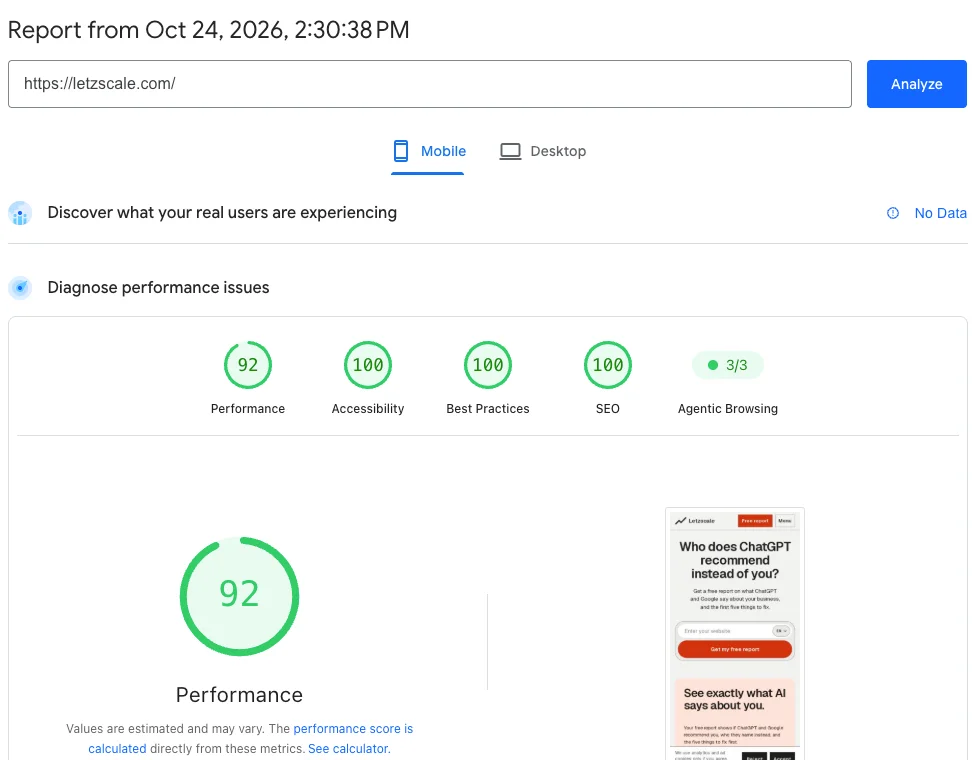
Our own home page in PageSpeed Insights on mobile, 24 October 2026. The top line reads No Data: Google shows field data only once a page has enough recorded Chrome visits over 28 days. Until then, use the lab test below it. The top part shows how real visitors experienced the page over the last 28 days. Google calls this field data. The page passes the Core Web Vitals Assessment when 75% of visits meet the "good" level for each measure:
Measure What it means Good Poor LCP
Largest Contentful PaintHow long until the main content, often the big top image, appears 2.5 seconds or less Over 4 seconds INP
Interaction to Next PaintHow fast the page reacts when someone taps or clicks 200 milliseconds or less Over 500 milliseconds CLS
Cumulative Layout ShiftHow much the page jumps around while it loads 0.1 or less Over 0.25 Small websites often have too few visits for field data. PageSpeed Insights then uses data for the whole website, or shows none. In that case, read the Performance score below it. It comes from a single simulated visit: 90 to 100 is good, 50 to 89 needs improvement, 0 to 49 is poor. It changes a little from one run to the next.
Fix images first
On most small business websites, the slow part is a large photo at the top of the page. Google's web.dev guide says the main content that loads is usually an image or a web font, and lists these fixes:
- Right size. Do not upload a 5,000-pixel camera photo for a space 1,200 pixels wide.
- Compress it, and use a modern format such as WebP or AVIF where your website supports it.
- Developers: never lazy-load the main top image, and give it
fetchpriority="high".
Run PageSpeed Insights again after the change. The suggestions further down the report name the files that slow the page; send them to your developer if they concern code rather than images.
Check it worked
Confirm one secure, fast address
Repeat step 1 in a new private window. If you have Google Search Console, its Core Web Vitals report shows how your pages do over time. Setup is in Guide 03.
Done when
- All four versions of your address end on the same
https://address, and inner pages keep their path. curl -sIshows301(or308), in one step.- The browser console shows no "Mixed Content" warnings on your home page and main service page.
- Both pages pass the Core Web Vitals Assessment on mobile, or, without field data, the Performance score is improving and you have fixed the largest images.
Common mistakes
What usually goes wrong
- A temporary redirect. A 302 or 307 tells Google the move is not final, so the old address may stay in results. Use 301 or 308.
- Redirect chains.
http://yourcompany.lu→http://www.yourcompany.lu→https://www.yourcompany.lu. Go straight to the final address in one step. - Sending every page to the home page. Keep the rest of the address so
/contactlands on/contact. - Half-finished HTTPS. The redirect works but canonical tags, the sitemap or internal links still say
http://. Update them too. - Lazy-loading the main photo. It makes the most important image wait. web.dev says never to lazy-load it.
- Chasing a perfect score. Google itself says a perfect score just for search may not be worth the effort. Aim for "good" on the pages people actually visit.
Sources, checked 24 October 2026
- Google: AI features and your website
- Microsoft: Data, privacy, and security for web search in Microsoft Copilot and Microsoft Copilot Chat
- Google: Understanding page experience in Google Search results
- Google: Redirects and Google Search
- Google: How to specify a canonical URL
- Google: Site moves with URL changes
- Nginx: Converting rewrite rules
- MDN: Mixed content
- Google: Mobile site and mobile-first indexing best practices
- Google: Understanding Core Web Vitals and Google search results · web.dev: Web Vitals
- PageSpeed Insights · About PageSpeed Insights
- web.dev: Optimize Largest Contentful Paint